

What do you do when a change is waiting for a decision?
Changes marked as waiting for a decision ask you to choose: for example, to move to another origin or to renegotiate a price. Those marked “For information” have nothing to choose; reading them or passing them to your customs broker is enough.
- Open the change. The panel on the right lists your options with the yearly saving or extra cost of each; the best one is marked.
- Confirm the option you'll go with. Your decision moves to Actions → Tasks.
- If someone else should decide, use “Assign” to give the change to a colleague with a due date. “Add note” leaves a note.
- If it doesn't concern you, press “Not now”. The change is marked as dismissed and stays on record.
- On the Actions page you see who owns each decision and when it is due. When it's done, press “Mark done”; done items stay as the record.
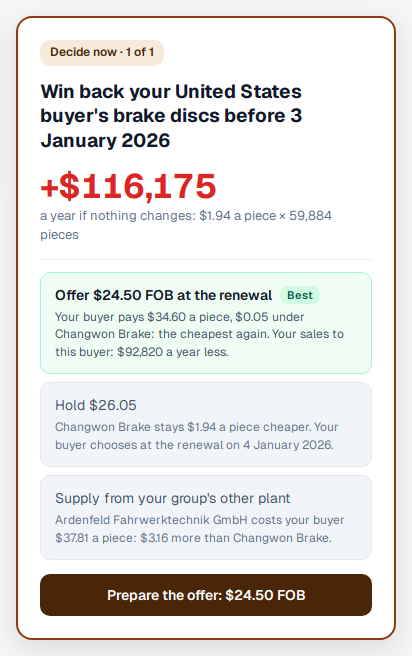
What happens to your numbers? A change reaches your lanes' cost by itself on the day it applies from; no confirmation is needed. On the Actions page, “What it does to you” shows which lane's unit cost moved and by how much (before → after), and the yearly amount. Confirming an option doesn't change the cost; it records your decision: if you decided to buy from another origin, the costs use it once you enter a quote or a declaration from there.